

BMS cloud vs on-premise: costs, subscription, compliance, benefits

BMS Cloud vs. On-Premise: Costs, Subscription, Compliance, Benefits
Cloud or on-prem? The real question isn't "where the software is installed," but who is committed to ensuring the BMS remains useful in 2, 5, or 10 years (updates, security, support, actual usage).
In practice, we often find the same expectations:
- the technical manager wants fewer alarms and more comfort,
- the energy manager wants clean data curves and proof of savings,
- procurement wants a controlled budget,
- management wants to be compliant with BACS / Tertiary Decree.
And in the middle: "BMS cloud or on-premise?"
The quick answer
- On-premise : relevant if you have a stable site, a strong internal team, and a contract that truly covers truly updates, security, and backups (otherwise, the BMS quickly becomes outdated).
- Cloud : relevant if you want a dynamic BMS dynamic (multi-site, scalable, maintained without a "re-project" every 3 years).
- Hybrid : very common: local control is maintained, and a cloud layer is added to centralize, analyze and control more simply.
In this article, we therefore compare BMS cloud vs BMS on-premise, in a very concrete way: operation, organizational impacts, costs, and the link with the subscription — to help you make an informed choice!
What is a BMS truly used for today?
Before discussing architecture (cloud or on-premise), we need to start with the basics: why install a BMS in 2025?
It's not just about "collecting data points." It addresses several key challenges:
- The comfort of occupants (temperature, air quality, stability).
- The energy performance (kWh, peak demand, load shedding).
- The technical reliability (monitoring equipment, detecting deviations).
- The regulatory compliance, particularly with the BACS decree and the Tertiary decree.
- The clarity for management (reports, trajectory, ROI of actions).
A BMS that only ticks these boxes on the day of commissioning, but is no longer used or updated after 3 years, fails to fulfill its mission.
Compare this to boiler maintenance: if you only perform maintenance in the first year, don't expect 10 years of reliability.
What is an on-premise BMS?
Let's now return to the on-premise BMS, which structured the market for 30 years.
In this model, the supervision software is installed on a server or industrial PC on your premises. You own the license, the supervision workstation is on-site, and data is stored locally. PLCs communicate with this server, which centralizes information and enables control.
On paper, this model has several advantages:
- You have the feeling of maintaining local control: everything is physically on your premises.
- If the internet goes down, the PLCs continue to operate locally.
- It remains a familiar environment for technical teams.
However, this model has a direct consequence, often underestimated at the time of selection: if updates, security, backups, and the evolution of the solution are not planned (and budgeted) in a contract, they... don't exist. You remain the owner of the license, of course, but also the owner of everything that comes with it: obsolescence, patches, backups, hardening, server replacement, etc.
In other words: an on-premise BMS can indeed be robust and durable — provided that the question "who maintains the system and with what budget?" is addressed from the outset.
What is a cloud BMS?
A cloud BMS takes a different approach.
Here, the core of the solution – the database, the supervision interface, the calculation and reporting engines – is hosted in a secure data center. You connect via a simple web browser, from the office, another site, or even from home.
On-site, the PLCs continue to do their job. The site's PLCs and equipment send their data to the platform (often via a gateway/edge), and can receive instructions, scenarios, or optimizations.
Key point (often misunderstood): In most cases, critical regulation remains local. So if the internet goes down, the building doesn't "stop": the automated systems continue to apply their regulation rules. What you temporarily lose is access to the platform and certain advanced optimization functions.
What the cloud truly changes:
- no more BMS server to maintain in the technical room,
- updates/backups/security handled by the provider,
- and for multi-site operations: a single interface that quickly changes the way you work.
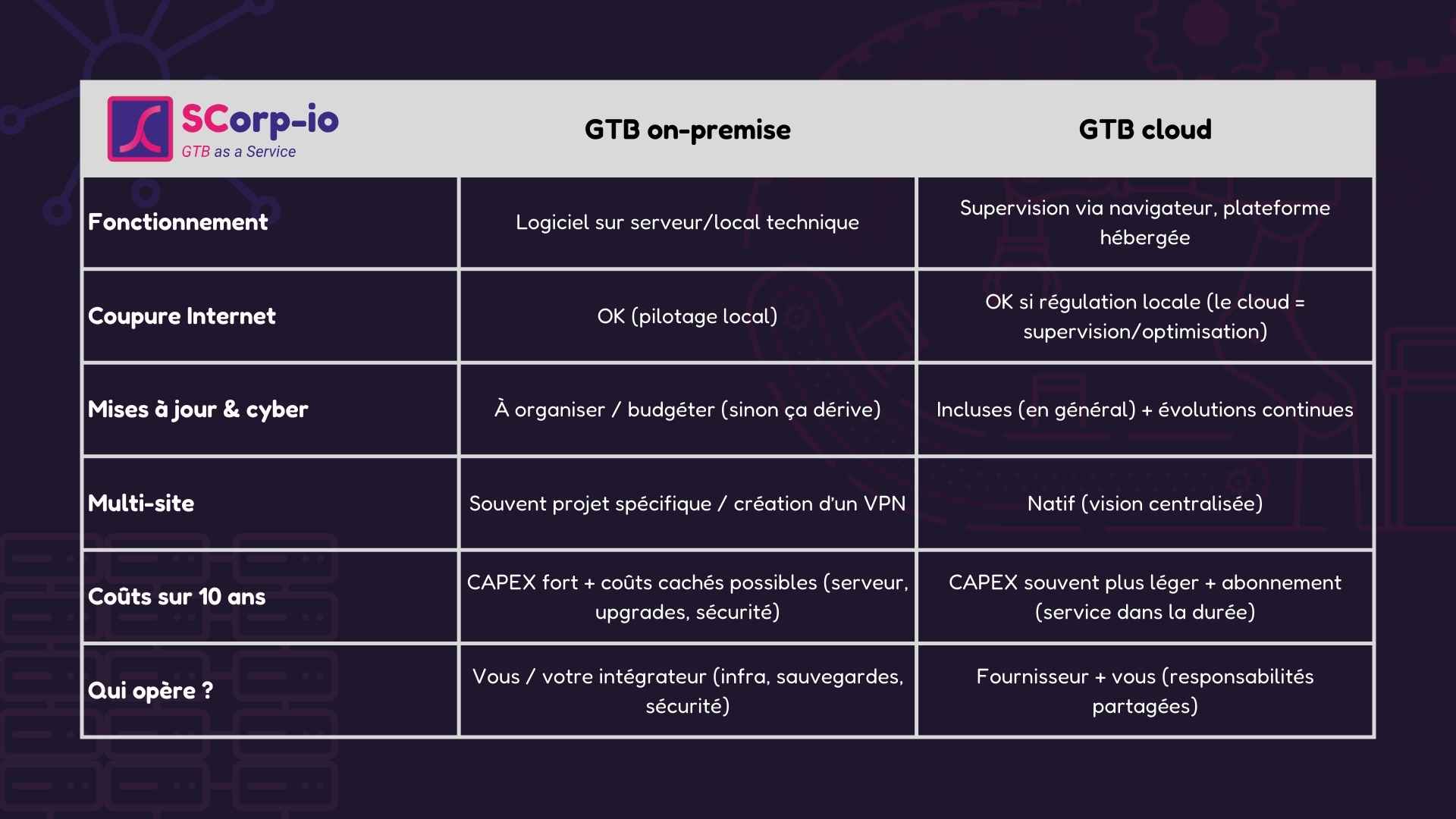
Cloud vs. On-Premise: Comparison Table
Subscription vs. One-Time Purchase: What It Really Changes
This is where subscription becomes a central topic: a BMS subscription, what exactly does it finance?
Nobody is thrilled to have "one more subscription." But in BMS, the question isn't ideological: it's often what determines long-term usage.
A BMS subscription can finance 3 components (when well-designed):
- Infrastructure : hosting, backups, security updates, monitoring.
- Usage : scenarios/schedules/instructions that evolve with reality (occupancy, weather, operations), actionable summaries, recommendations.
- Commitment : service levels, deadlines, update frequency, evolution rules.
⚠️ Not all subscriptions are created equal: some boil down to “login + support for critical bugs”. That’s “ok”… but you remain in a product, not service.
Cost over 10 years: where's the difference hidden?
Instead of comparing “purchase price vs subscription price”, compare the total cost + the risk of abandonment.
| Poste de coût | On-premise (souvent) | Cloud (souvent) |
|---|---|---|
| Démarrage | Licence + intégration/projet (souvent CAPEX). Paramétrage local, poste de supervision. | Mise en service + onboarding. Abonnement dès le départ (souvent OPEX). |
| Infrastructure de supervision | Serveur/PC industriel, stockage, OS, durcissement, monitoring… à prévoir et maintenir. | Hébergement et exploitation inclus (selon offre). Moins de dépendance matériel côté supervision. |
| Licences & versions | Licence “perpétuelle”, mais versions majeures / extensions souvent payantes. | Évolutions logicielles généralement incluses (selon contrat). |
| Mises à jour (fonctionnelles + sécurité) | Souvent en prestation ou contrat. Risque de décalage si ce n’est pas planifié/budgété. | Mises à jour continues opérées par le fournisseur (rythme et périmètre selon offre). |
| Sauvegardes & PRA | À concevoir et opérer : sauvegardes, tests, restauration, plan de reprise d’activité. | Généralement intégré à l’exploitation (sauvegardes, redondance) selon offre/SLA. |
| Cybersécurité | Responsabilité principalement côté client (patch, durcissement, comptes, VPN, audits…). | Responsabilité partagée : fournisseur (plateforme) + client (réseau, accès, équipements). |
| Support & maintenance | Variable : peut être limité au correctif “bloquant” si contrat minimal. | Souvent inclus via abonnement ; niveaux de service à cadrer (SLA, délais, périmètre). |
| Évolutions & multi-site | Ajouts (nouveaux usages/sites) souvent “projets” successifs, plus lourds à maintenir. | Natif multi-sites (selon architecture). Ajouts souvent plus rapides côté supervision/visualisation. |
| Obsolescence matériel | Remplacement serveur/OS (souvent tous les 5–7 ans) + migrations associées. | Moins de “chantiers serveur”, mais dépendances côté passerelles/edge à maintenir. |
| Coûts “invisibles” | Temps interne + GTB moins utilisée si elle vieillit (données moins fiables, UI datée, etc.). | Risque principal si abonnement trop minimal : plateforme présente, mais peu exploitée. |
Note : ce tableau compare des tendances sur 10 ans (TCO). Les coûts réels dépendent du nombre de sites, du niveau de service, de la cybersécurité, et surtout du modèle d’exploitation (qui fait vivre la GTB au quotidien).
👉 The goal isn't “to pay less in year 1”. It's: what costs you (and earns you) over 10 years?
Simple test when you talk to a supplier:
“Tell me what happens 6 months after launch, then 2 years after. Who monitors what? Who adjusts what? Who detects deviations?”
If things are unclear, the risk isn't the architecture itself... it's the absence of an operating model.
Four criteria for choosing between cloud BMS and on-premise BMS
1. Your long-term vision: Where do you see yourself in 10 years?
If the BMS simply needs to manage a single building with little expected change, a well-defined on-premise solution might be sufficient.
If you have plans for multi-site operations, expansions, or new applications (sub-metering, air quality, BACS, etc.), a cloud platform model will generally be more suitable because it's designed to evolve with your needs.
2. Your energy / BACS / Tertiary Decree objectives.
If the BMS is primarily there to "see what's happening," both models will work. If you rely on it to drive action plans, prove savings, and track regulatory compliance, you need a system that updates itself, properly aggregates data, and allows settings to be adjusted over time. In this case, the question is no longer just on-premise vs. cloud, but "who is committed to long-term performance?"
3. Who will manage the BMS day-to-day?
If you have an in-house team ready to delve into the data, scenarios, and reports, you can handle more in-house. If not, the subscription should clearly include someone "on the other side" who doesn't just wait for your calls but actively helps you operate the BMS. Otherwise, regardless of the architecture, it will eventually run on autopilot without proper management.
4. Your CAPEX / OPEX preference… and the true cost over 10 years.
A large initial investment might seem easier to justify, but if it doesn't come with updates, support, or performance monitoring, you're essentially buying only two or three good years. A more comprehensive subscription might appear more expensive line by line, but it includes infrastructure, functional evolution, and optimization. The goal isn't to pay as little as possible in year 1; it's to honestly assess what each model costs you — and brings you — over ten years.
Can on-premise and cloud BMS be combined?
Yes, the two models are not necessarily exclusive. In many buildings, there's already a manufacturer's on-premise BMS that properly controls the equipment and has been depreciated.
In this case, a pragmatic approach is to keep the on-premise BMS for low-level control and add a cloud layer on top to centralize data, facilitate multi-site oversight, and enable useful functions (analytics, scenarios, adding equipment or IoTs, etc.). This is often a good way to test the value of a solution like ours.
And where does SCorp-io fit into all of this?
SCorp-io checks the "cloud BMS" box: the platform is hosted, maintained, and updated by us; access is via a multi-user web interface designed for operations, energy, and management teams; and we can connect to existing BMS systems as well as new (or old) equipment.
Ultimately, the most important thing isn't the name on the solution; it's the long-term model. A BMS must remain dynamic : settings, updates, validation, compliance, and field feedback.
And if you'd like to discuss it, even without an immediate project, we're happy to do so. That's often how we clarify the right level of ambition, the right model (well-defined cloud, hybrid, or on-premise), and agree on the common goal... which is shared by all of us in this industry: to consume more efficiently and sustainably.
You might be interested in this
Explore more articles on energy management and smart buildings.

Ready to transform your energy management
Start with a personalized demo or a free audit of your facilities.
